Transcript
The narration is in Saudi Arabic. This is its English translation, which also appears on screen as subtitles.
Setting up the AI agent
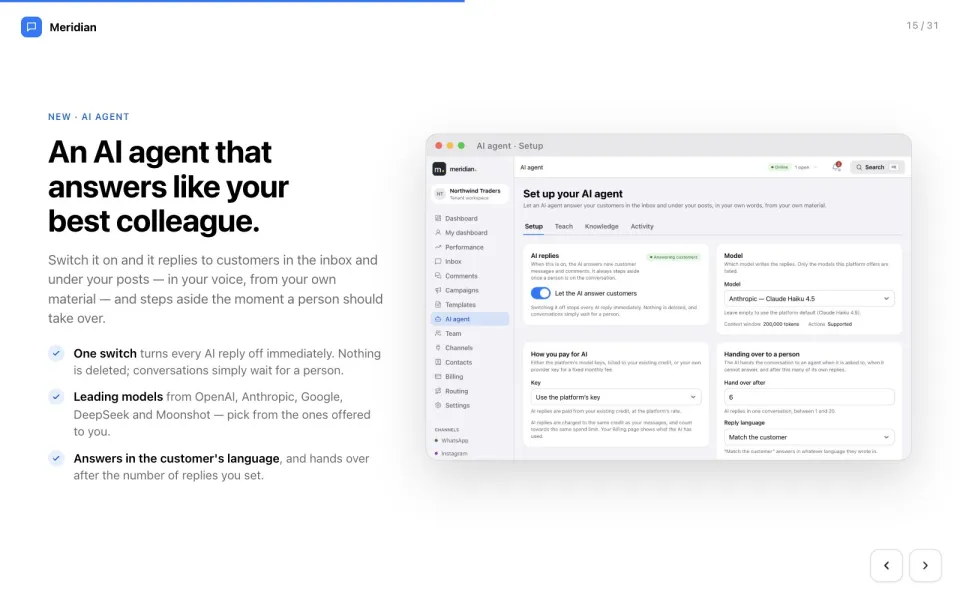
In this video: your AI agent, your team, and the settings that keep everything running smoothly. Your AI agent answers customers for you around the clock, in your own words. Switch it on, choose the AI model, and decide how you pay for it. Decide when it hands over to a person, and which language it replies in.
Teaching the assistant
On Teach, describe who your assistant is: its name, your business, its tone and its languages. Add worked examples: what customers really ask, and the ideal answer. Set the rules it must never break, and the topics that always go to a person. Then try it in the playground, before any customer sees a reply.
Knowledge
On Knowledge, give it the facts: write answers, upload documents, or link pages from your website. It only states facts it finds here. Anything it cannot find, it hands to your team.
AI activity
Activity shows what the assistant did: replies sent, conversations handed to a person, and why.
Team and roles
On Team, invite colleagues by email, and give each one a role, from owner to read-only viewer. See who is online, and how many conversations each person is handling right now.
Routing and presence
Routing sends every new conversation to the right person automatically: round-robin or least busy. Set how many open conversations each agent can hold, so no one is overloaded. Set your own status: online, away or on a break. New work waits while you are away.
Channels
On Channels, connect your own WhatsApp, Instagram and Facebook accounts, with a live health check.
Settings and security
In Settings, manage your profile and protect your account with two-step verification. Review every device that is signed in, and sign out the ones you do not recognise. Manage your team’s tags, saved replies and custom contact fields in one place.
Search, notifications and dark mode
Press Command K to search anything: customers, conversations or pages. The bell keeps you informed about new assignments and important alerts. And work the way you like, in light or dark mode. That is Meridian: every conversation, campaign and customer, in one place. Thank you for watching.