
AI agent

An AI agent for WhatsApp, Instagram and Messenger that answers from your knowledge

Meridian’s AI agent replies to your customers in the inbox and under your posts — in your voice, from your own material — and steps aside for a person whenever it should. You decide what it knows, what it says and when it stops.

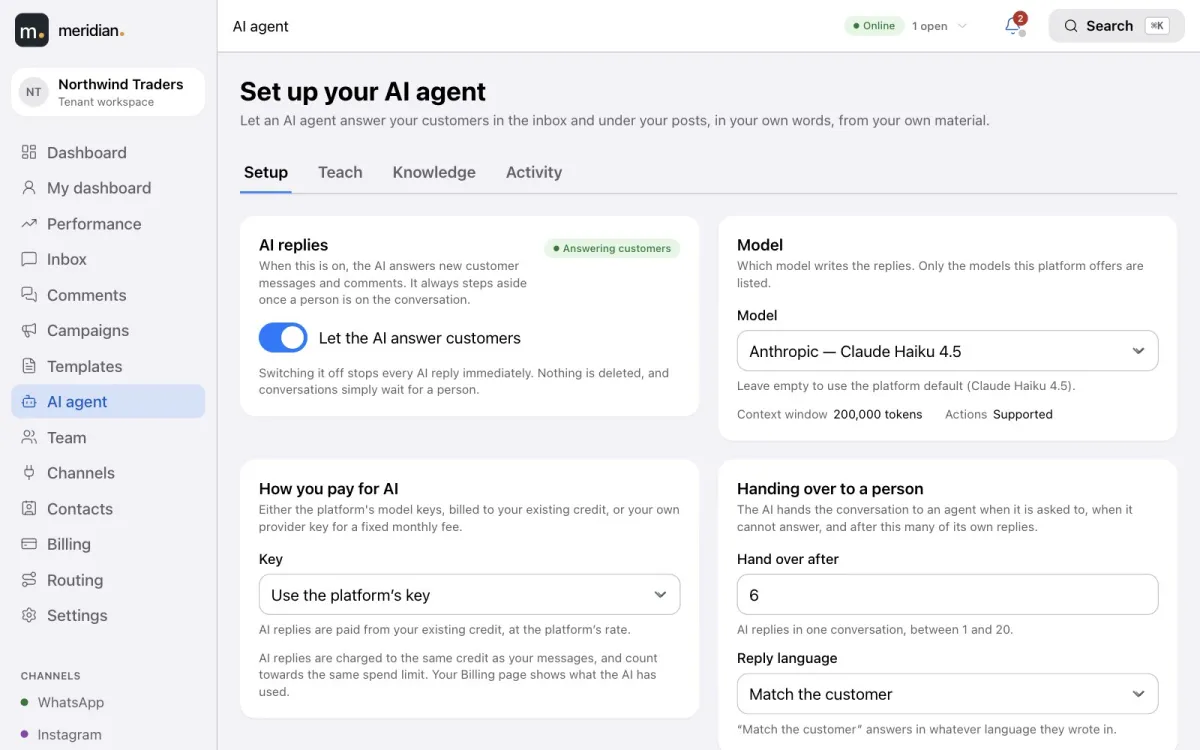
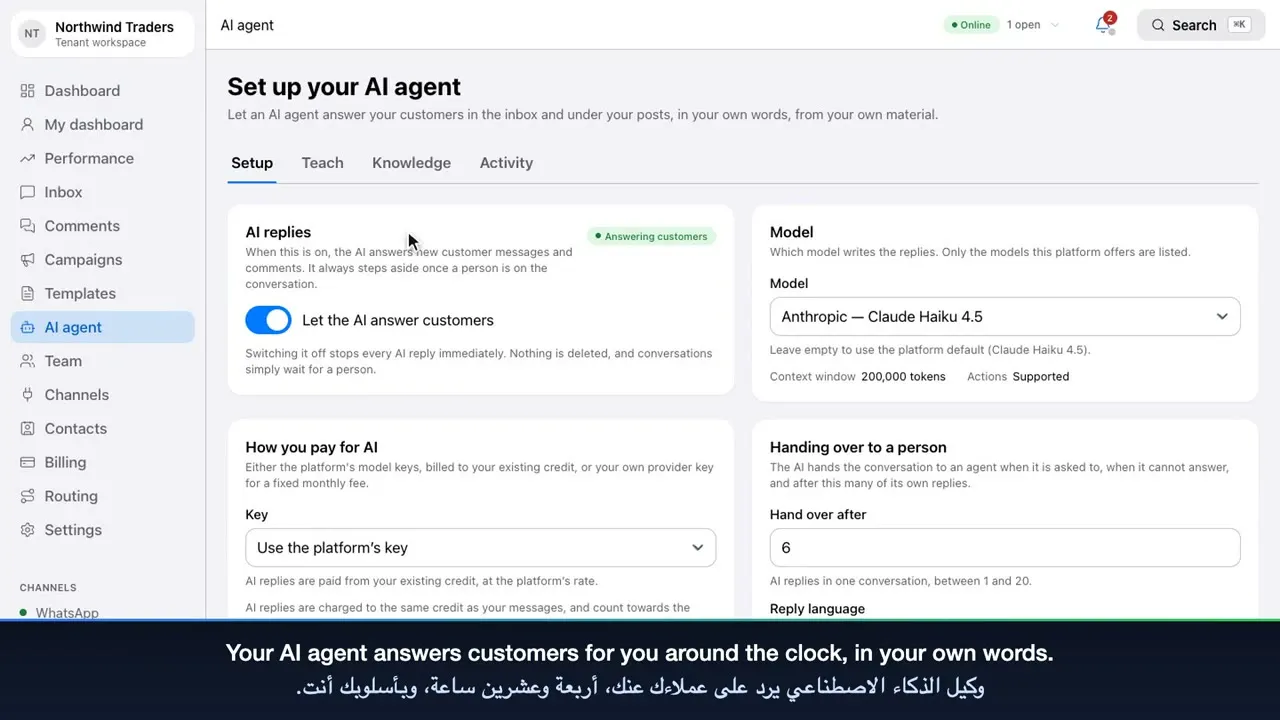
AI agent setup: the switch that lets the AI answer customers, the model, how you pay, and hand-over settings.

At a glance

  • Replies on WhatsApp, Instagram and Messenger, and to comments on your posts.
  • Answers only from your written answers, documents, web pages and saved replies.
  • Transcribes voice notes and reads photos; videos go to a person.
  • Hands over to your team with the reason, and stays silent once a person is on it.
  • Pause it for the whole workspace, one conversation or one comment thread.
  • Models from OpenAI, Anthropic, Google, DeepSeek and Moonshot.
  • Paid from your Meridian balance, or with your own provider key.
  • Replies in the customer’s language, or always in the one you choose.

Teach it like a new team member, not a prompt

The Teach page asks, in order, what a good manager would tell a new hire. Meridian turns your answers into the assistant’s instructions — you never write a prompt.

  • Who it is — its name, what your business does, its tone and the languages it can answer in.
  • What it helps with — a clear scope, and worked examples of what customers really type and what should happen.
  • Rules — what it must never do, and the topics that always go to a person.
  • Test — try it before any customer sees a reply.
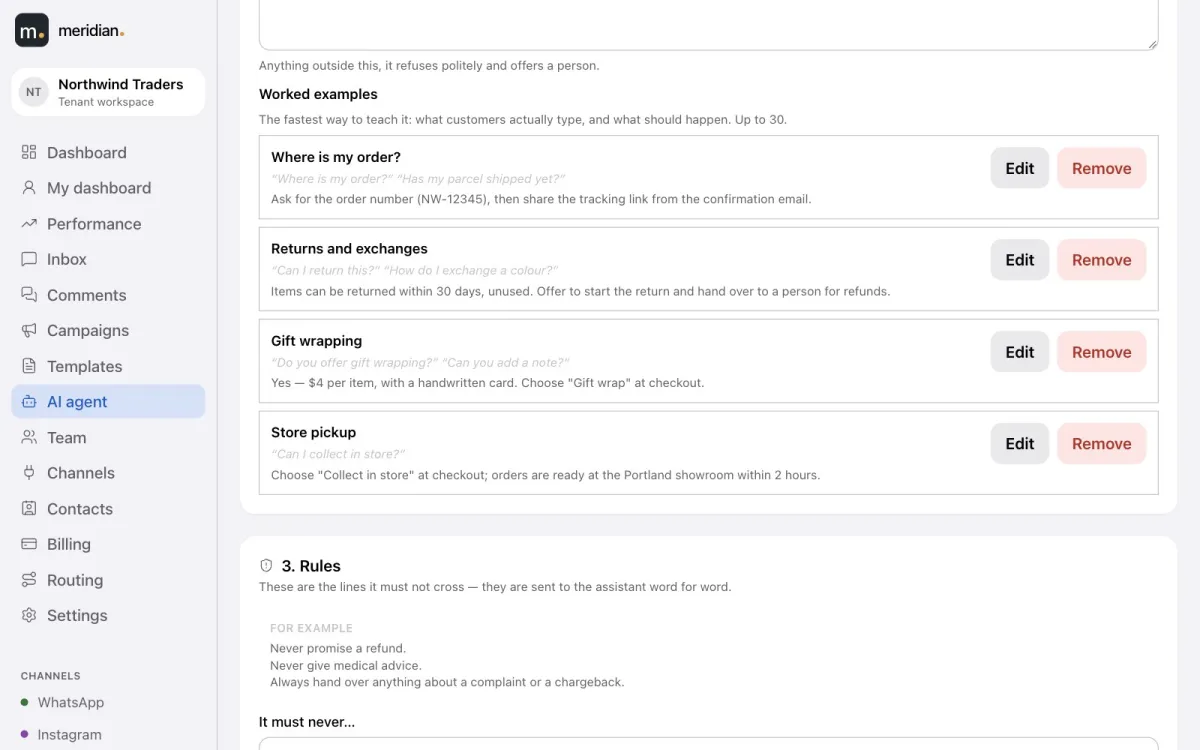
Worked examples on the Teach page: where is my order, returns and exchanges, gift wrapping and store pickup.

Knowledge it cannot invent

Give it the answers you already have. The assistant states only facts it finds in your material, and records what each reply was based on. Anything it cannot find, it hands to your team instead of guessing.

  • Written answers — one question, one answer, in your own words.
  • Files — PDF, Word, text and Markdown documents.
  • Web pages — add a page from your website and refresh it when it changes.
  • Saved replies — the snippets your team already uses, read live.
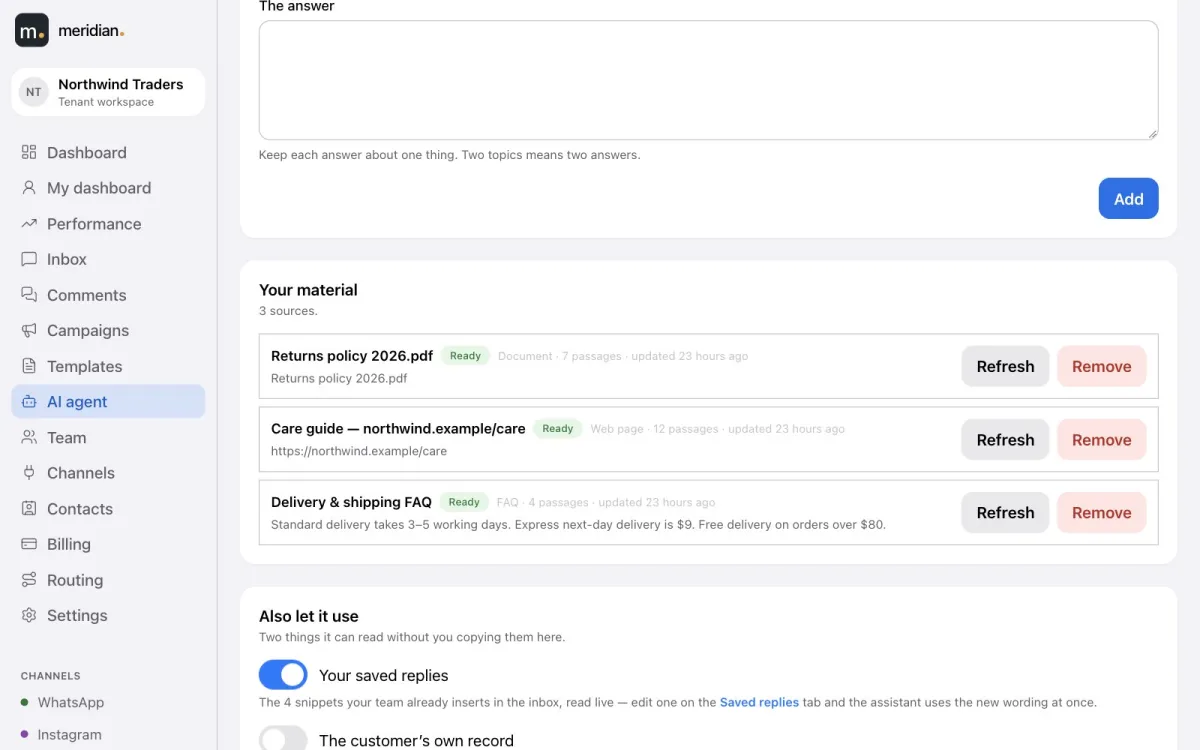
Knowledge sources: a returns policy PDF, a care guide web page and a delivery FAQ, with saved replies switched on.

Hand-over rules you control

When the assistant should not answer, it assigns the conversation through your normal routing with the reason, and stays silent while a person handles it.

  • The customer asks to speak to a person.
  • The topic is on your “always a person” list.
  • Your material doesn’t have the answer.
  • It has sent the number of replies you allow in one conversation.
  • Your balance runs out — and you’re shown how to top up.
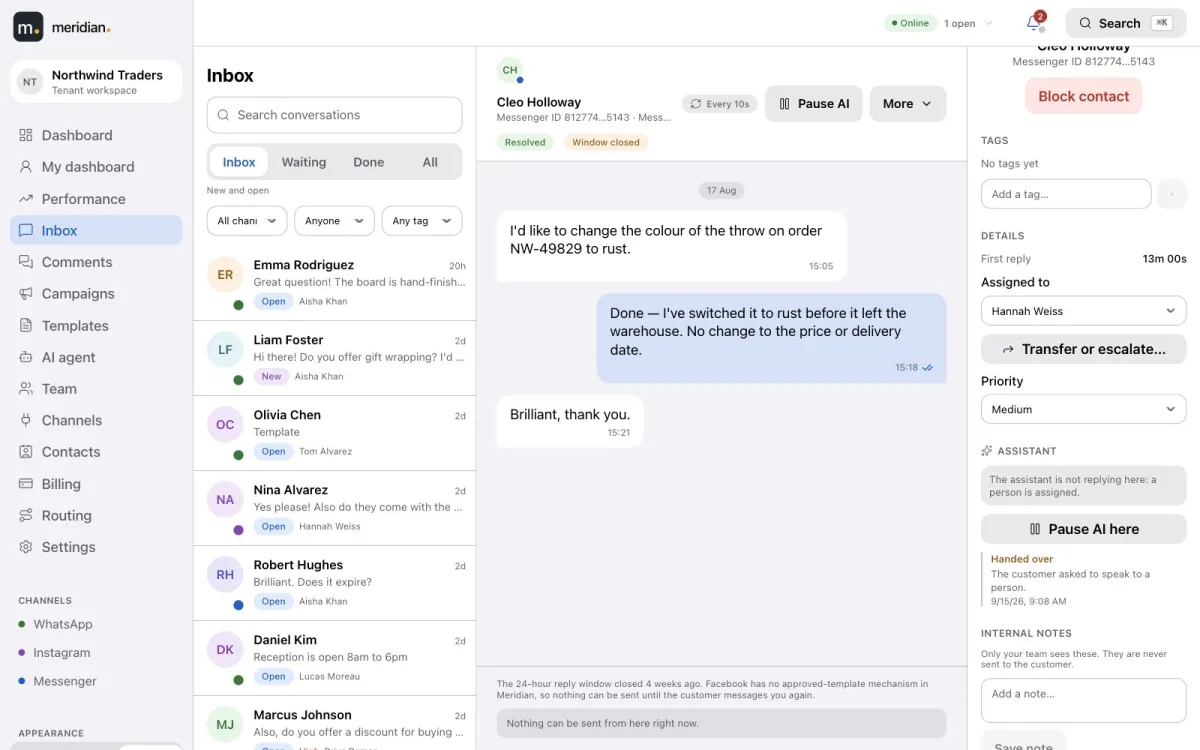
A Messenger conversation with the assistant panel: handed over because the customer asked to speak to a person, and a Pause AI here button.

One switch, and a pause on every conversation

Turn AI replies off for the whole workspace in one click — nothing is deleted, conversations simply wait for a person. Or pause it on a single conversation or comment thread, and see who paused it and when.
Voice notes, photos and videos

Customers don’t always type. Voice notes are transcribed and answered in text, and your agents see the transcript too. Photos are read by models that can see. Videos, and anything it cannot read, go straight to a person.

Comments on your posts

The assistant can answer Instagram and Facebook comments as well — publicly under the post, or privately in the customer’s inbox, as you choose.

Every decision, and what it cost

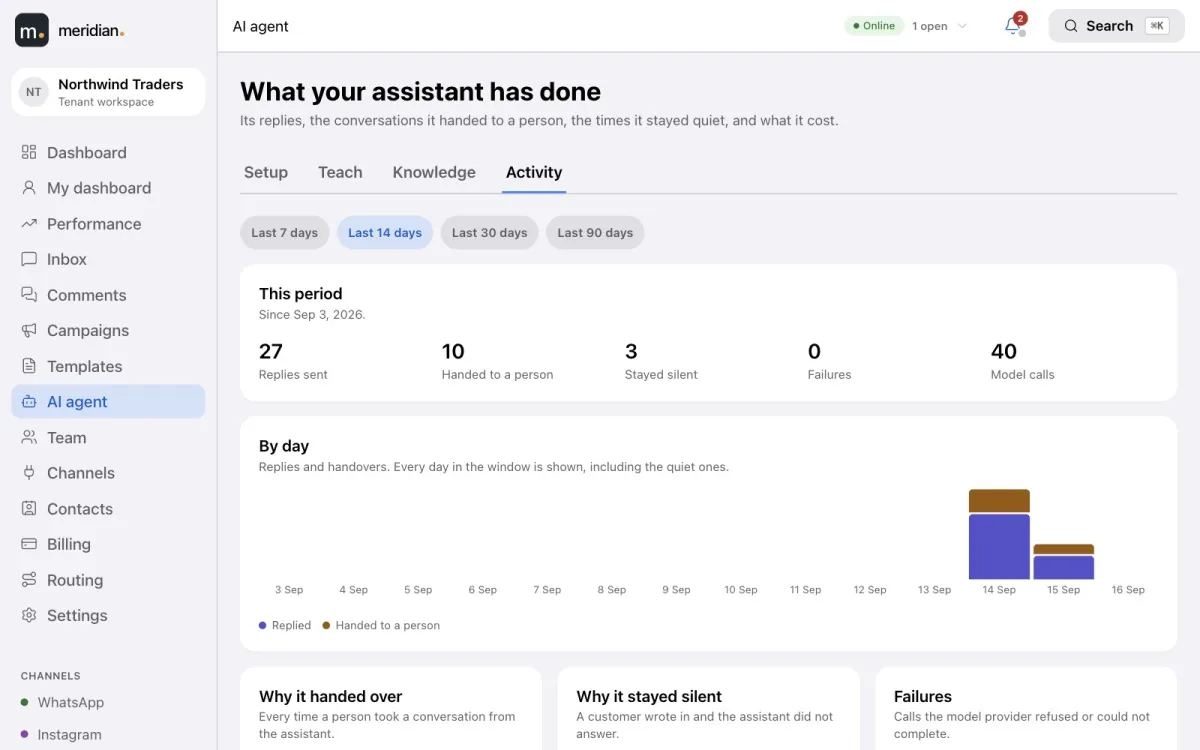
The Activity page shows the replies it sent, the conversations it handed over and why, the times it stayed silent, any failures, and tokens and spend by model. AI usage is paid from the same balance as your messages — or with your own provider key for a fixed monthly fee.

AI activity: replies sent, conversations handed to a person, times it stayed silent, failures and model calls by day.

Video tutorial

The AI agent, team and settings

Set up and teach the AI agent, give it knowledge and review its activity, then invite your team, configure routing and channels, and secure your account.

Frequently asked questions

Which AI models can the agent use?

Meridian supports models from OpenAI (ChatGPT), Anthropic (Claude), Google (Gemini), DeepSeek and Moonshot (Kimi). You choose from the models offered on the platform.

Can the AI agent reply in Arabic?

Yes. It can answer in the language each customer writes in, or always in a language you choose. You list the languages it may use; if a customer writes in another one, it hands the conversation to a person.

Can I stop the AI agent at any time?

Yes. Switch AI replies off for the whole workspace, or press Pause AI on a single conversation or comment thread. Nothing is deleted; the conversation simply waits for a person.

What happens when the AI agent doesn’t know the answer?

It hands the conversation to a person through your normal routing, with an internal note saying why, instead of guessing.

Can the AI agent understand voice notes and photos?

Yes. Voice notes are transcribed and answered in text, and photos are read by models that can see. Videos are handed to a person.

How is AI usage billed?

From your Meridian balance, alongside your messages, with usage shown by model and by day. Or connect your own provider key, pay the provider directly, and pay a fixed monthly fee.

Bring every conversation into one place.

Create your Meridian account, connect your channels and start answering today.